
Time tracking that treats people like adults.
One place to track hours, approve timesheets, invoice clients and pay contractors. Honest hours, fair pay.
No credit card needed. No screenshots, ever.

Type what you did. It files itself.
Write it the way you'd say it. Honest Day picks the client, project and task, the time, the date, the notes and the tags.
A small sample catalog: Birchwood Bikes and Harbor Coffee Roasters, one project, three tasks. In the app it reads your own clients, projects and tasks, and asks the AI to pick when it can't tell.
No screenshots. No keystroke or app monitoring. No activity scores. No leaderboards.
Hours are what people say they worked, with a note about what they did. That is the whole record.
If a timer keeps running while someone steps away, Honest Day asks when they're back: you were away 14 minutes, remove it? Their call. Nothing about what they did gets recorded.
We run teams of contractors ourselves. Most tools we tried treated them as suspects. We would rather ask.


People submit. A person approves.
Weeks get submitted, then approved or sent back with a note. No score decides anything.
A live view, kept plain.
See who is tracking what right now, and today's totals. That is all a manager needs to ask for.
Idle time is a question.
When someone is back, they choose: keep the time, or remove it and carry on. Your timer, your call.
The whole loop, in one place.
Track the hours. Approve the week. Invoice the client. Pay the contractor. Same data the whole way, so nothing gets retyped.
Start a timer, drop in a week, or just type it.
A day view with a timeline, a week grid, and a calendar where you drag to create, move and resize. Everything has a keyboard shortcut, and Cmd K jumps anywhere.
- Start buttons inside Gmail, Shopify admin, Slack, OpenPhone and Google Docs, from the Chrome extension.
- Clients, projects and tasks, billable or not, with notes and tags on every entry.
- Hourly rates by project, task or person, fixed fees, and budgets with alerts.

Weeks get submitted. A person approves them.
People submit their week. You approve it, or send it back with a note. Approved weeks lock, so the numbers you invoice from don't shift under you.
- A Friday reminder email nudges anyone who hasn't submitted.
- Time off requests, with approved days filling the timesheet.
- Expenses with receipt photos that flow onto the next invoice.
Approvals and time off are part of Premium.

Invoices write themselves from time nobody has billed yet.
Pick a client and a period. Honest Day pulls the unbilled time and expenses onto an invoice you can edit, and you send it by email with a link.
- Taxes, discounts, your logo and brand color, and PDF through print.
- Estimates the client accepts online, recurring invoices and retainers.
- Card payments with your own Stripe account, a client portal, and overdue reminder emails.
Unlimited invoices on every plan. Estimates, recurring invoices, retainers, card payments, the portal and reminders are part of Premium.

Pay contractors from their own hours.
Each person's hours at their cost rate become a statement. Share a link so they can check it, then mark it paid once you've paid it.
- The same hours show the client's number and your cost, so margin is never a guess.
- Statements per person and period, in draft, approved or paid.
Honest Day keeps the statement and the status. You still send the money the way you do today.

See where the hours and the money went.
Summary, detailed and profitability reports by client, project, task, person, day or tag. Filter anything, export to CSV, or have a report emailed every week or month.
- Revenue, cost and margin, not just hours.
- Billable and uninvoiced totals at the top, so nothing slips.
Basic reports and CSV export are free. Profitability reports and report emails are part of Premium.

An assistant that does things.
Ask Honest Day how many hours you billed Birchwood in September and it looks it up. Tell it you spent half an hour on the Birchwood inbox and it logs that. It can start a timer too.
It only sees what the person asking is allowed to see, and it runs on a small, low-cost model.
Use Claude, ChatGPT or Cursor instead? Honest Day has an MCP server, so they can log time and draft invoices for you. There is also a REST API, webhooks and Slack notifications.
The assistant is on every plan, with 20 turns a day free and 500 or more on Premium. The API, webhooks, MCP server and Slack are part of Premium.

The small stuff that adds up.
Chrome extension
Start buttons in Gmail, Shopify admin, Slack, OpenPhone and Google Docs, plus a toolbar timer and badge.
Keyboard first
Shortcuts for the timer, and a Cmd K menu to jump anywhere or start something.
Budgets and expenses
Budgets in hours or fees with monthly reset and alerts. Snap a receipt and it flows onto the invoice.
Time off
Requests, approvals, and approved days that fill the timesheet. Part of Premium.
Reminders that behave
A Friday email for unsubmitted weeks, and overdue reminders to clients after 3, 10 and 21 days.
On your phone
Add it to your home screen from the browser. A web app, not a native one.
No passwords
Passkeys or an email link to sign in. Light and dark, to match your system.
Bring your history
Import from Harvest, Toggl or any time CSV, with a preview first. Nobody gets emailed.
Built to be passed along.
Contractors recommend tools that respect them. So the pieces that leave the app are the ones worth sharing.
Share your week
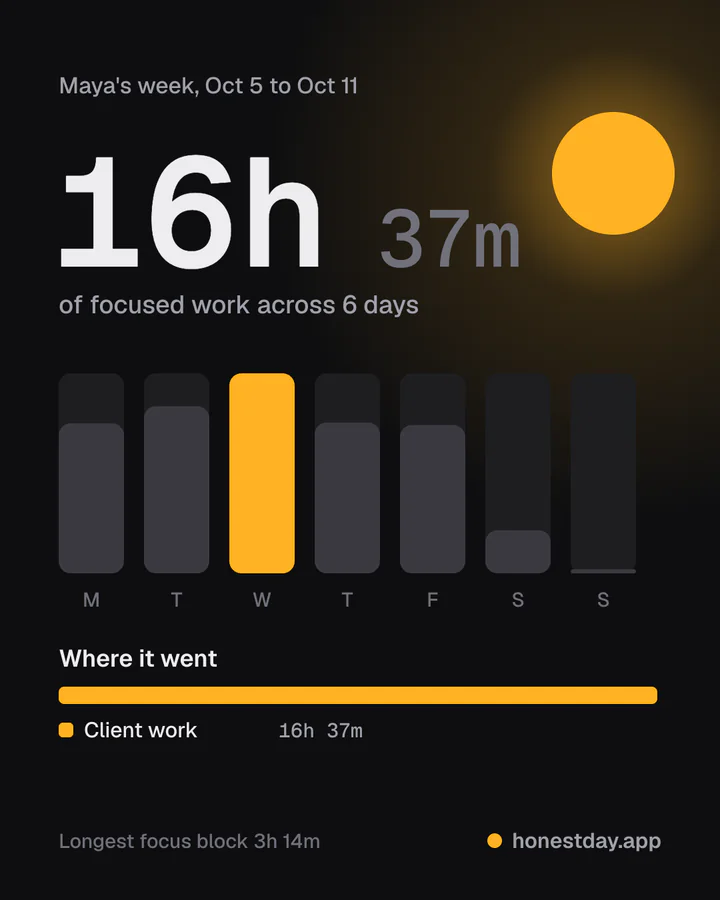
A card with your hours, your busiest day and where the time went. Project and client names stay hidden unless you turn them on. Post it, or don't.
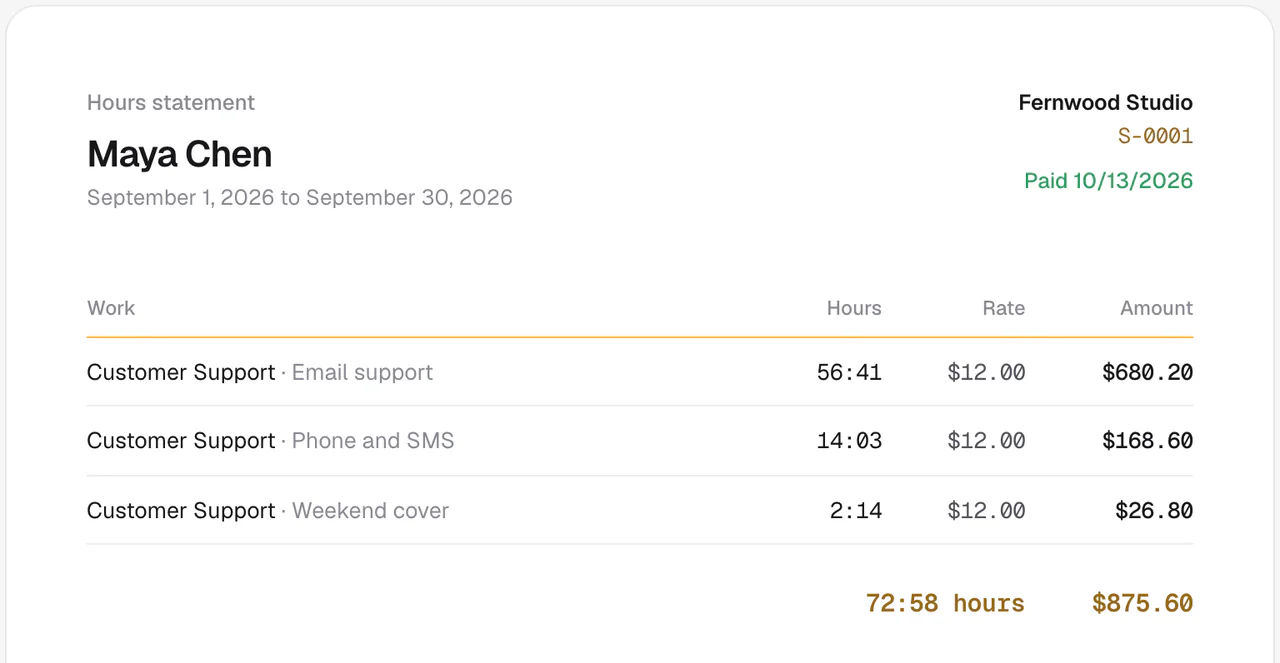
A statement you can check
Your hours at your rate, on a link that opens without an account. Marked paid when it's paid.
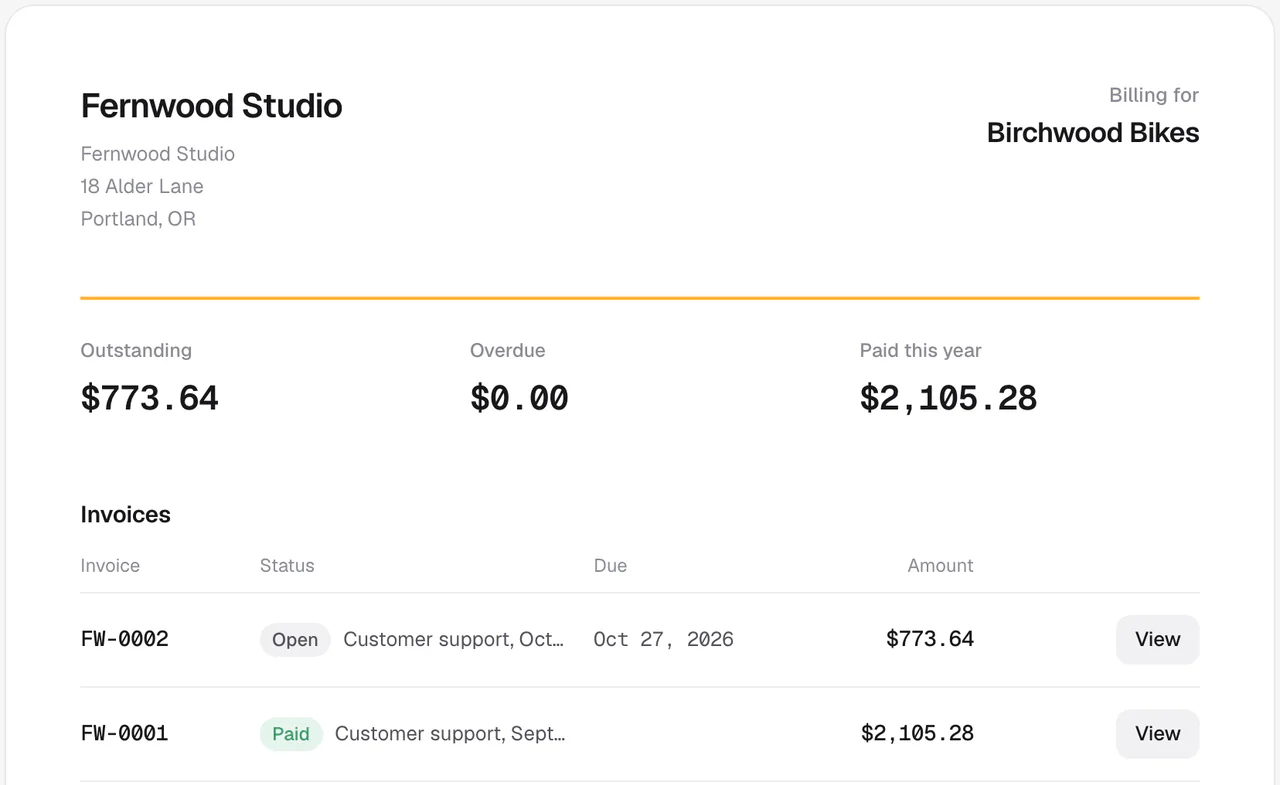
A portal for clients
One link per client: what they owe, what's overdue and what they've paid, with a way to open and pay each invoice.
Invoice and statement web pages and emails show a small "sent with Honest Day" line that you can switch off in one click, and PDFs never carry it. Premium adds your own branding. The client portal is part of Premium.
Priced by team size, not per person.
One price covers up to 10 people, then it steps up in blocks of 10. Projects, clients and invoices never cost extra.
Free
For a small team getting started.
- Up to 5 members
- Unlimited projects, clients and time entries
- Timer, week grid and calendar
- Chrome extension
- Basic reports and CSV export
- Unlimited invoices, with no Honest Day branding on the PDF
- 20 AI turns a day
Premium
Two months free. That is $7.50 a month.
Launch price for the first 1,000 workspaces, then $19 a month or $190 a year for up to 10 people. Each extra 10 people add $10 a month ($100 a year), up to 100 people. No usage fees. Your launch price stays the same for as long as your subscription stays active. More than 100 people? Email hello@honestday.app.
Everything in Free, plus
- Timesheet approvals and time off
- Profitability reports
- Recurring invoices, retainers and estimates
- Card payments through your own Stripe account, and the client portal
- QuickBooks Online sync (coming soon)
- API, webhooks, MCP server and Slack
- Report emails and overdue reminders
- Your logo and colors
- 500 or more AI turns a day
Start free, upgrade any time from Settings. Workspace owners find it under Settings, Plan, in the app.
Start freeThe same team of 10, on list prices.
Monthly billing, as shown on each pricing page in October 2026. Honest Day's yearly plan is $90 for up to 10 people.
- Harvest, TeamsPlus usage charges for extra invoices, projects, clients and tasks, per their pricing page$110per month
- Toggl Track, StarterApprovals and profitability reports sit on Premium, at $240$120per month
- Honest Day, PremiumApprovals and profitability reports included. $9 launch price for up to 10 people, then $19. Yearly is $90 for up to 10 people$9per month
Harvest charges $11 per seat monthly for Teams, and keeps timesheet approvals and profitability reporting on Enterprise. Toggl Track charges $12 per user monthly for Starter and $24 for Premium. Both bill less on annual plans. Prices change, so check theirs before you decide. Even at the standard $19, or $190 a year, Honest Day Premium is far under both per-seat totals. A larger team pays $10 more a month for each extra 10 people: see pricing.
Coming from somewhere else?
Here's an honest look at how Honest Day compares, including where the others are ahead.
Honest Day vs Harvest
Harvest has native apps and accounting sync. We add contractor pay and AI, and price by team size instead of per seat.
Honest Day vs Toggl Track
Toggl is a strong tracker with no screenshots either. We carry on through invoicing, the client portal and contractor pay.
Honest Day vs Clockify
Clockify starts free and is hard to beat for plain tracking. We are for teams that also want invoices, approvals and contractor pay with pricing by team size.
Prices checked October 2026. All comparisons, the cost calculator and Harvest pricing in 2026.
Switch in minutes.
Import from Harvest, Toggl or any time CSV: people, clients, projects, tasks and every hour. Export from your old tracker, sign in and open Import, check the preview, and you're done. Any other tracker's CSV works too, and running it twice is safe. If you get stuck, email hello@honestday.app.
Questions people ask.
Short answers. If yours isn't here, sign in and ask the assistant, or tell us.
Does it spy on my team?
No. Honest Day has no screenshots, no keystroke or app monitoring, no activity scores and no leaderboards. Hours are what people say they worked, with notes. If a timer keeps running while someone is away, it asks them when they come back whether to remove that time. It doesn't record what they did. Managers can see who is tracking what right now and today's totals, and that's the extent of it.
Can I import from Harvest or Toggl?
Yes. Switch in minutes: import from Harvest, Toggl or any time CSV, with people, clients, projects, tasks and every hour. Export a CSV from your old tracker, sign in, and open the Import page in Honest Day. A CSV from any other tracker works too. You get a preview first, running it twice won't double up your entries, and nobody gets emailed. Missing clients, projects, tasks and people are created for you. If something looks off, email hello@honestday.app and we'll help.
Is it free?
Yes, to start. The free plan covers up to 5 members, with unlimited projects, clients, time entries and invoices. Premium has a launch price of $9 a month for up to 10 people, or $90 a year (two months free), for the first 1,000 workspaces. After that it is $19 a month or $190 a year. Each extra 10 people add $10 a month ($100 a year), up to 100 people, and there are no usage fees. The launch price stays for as long as your subscription stays active. For more than 100 people, email hello@honestday.app. Start free and upgrade any time from Settings, Plan inside the app after you sign up (workspace owners only). Nothing happens to your data if you leave. You can export everything as CSV.
Who's behind it?
Honest Day is made by Ankur Shrestha, who runs contractor-heavy businesses of his own. He built it because he manages contractors every day and got tired of tools that treat them as suspects. You can reach him at hello@honestday.app.
Where is my data?
On Cloudflare. The app, its database and its file storage for receipts and logos all run there. People sign in with passkeys or an email link, so there are no passwords to leak. You can export your time as CSV whenever you like. The details are on the privacy page.
Is this honestday.ai?
No. Honest Day at honestday.app is a time tracker. It is unrelated to honestday.ai, an AI check-in product.
Does it work on my phone?
Yes. Open it in your phone's browser and add it to your home screen, and it behaves like an app. It is a web app, not a native one, so there is nothing to download from an app store.
What can the AI assistant see?
Ask Honest Day answers questions from your data, and logs time or starts a timer when you tell it to. It only sees what the person asking is allowed to see, so people who can't see rates don't get rates. It runs on a small, low-cost model. The free plan includes 20 AI turns a day and Premium includes 500 or more.
How do clients pay me?
You send an invoice by email with a link. Clients can open it, check everything they owe in a client portal, and pay by card when you've connected your own Stripe account. Card payments and the client portal are part of Premium.
Can it connect to my other tools?
There's a Chrome extension with start buttons inside Gmail, Shopify admin, Slack, OpenPhone and Google Docs. For everything else there is a REST API, webhooks, Slack notifications and an MCP server for Claude, ChatGPT and Cursor. There is no QuickBooks or Xero sync, and invoices export as CSV.
Track one week the honest way.
Free to start, with no credit card. Switch in minutes: import from Harvest, Toggl or any time CSV.
No screenshots, ever.